S91 Luxury Brands Lucky Draw
What Is S91 Luxury Brands Lucky Draw?
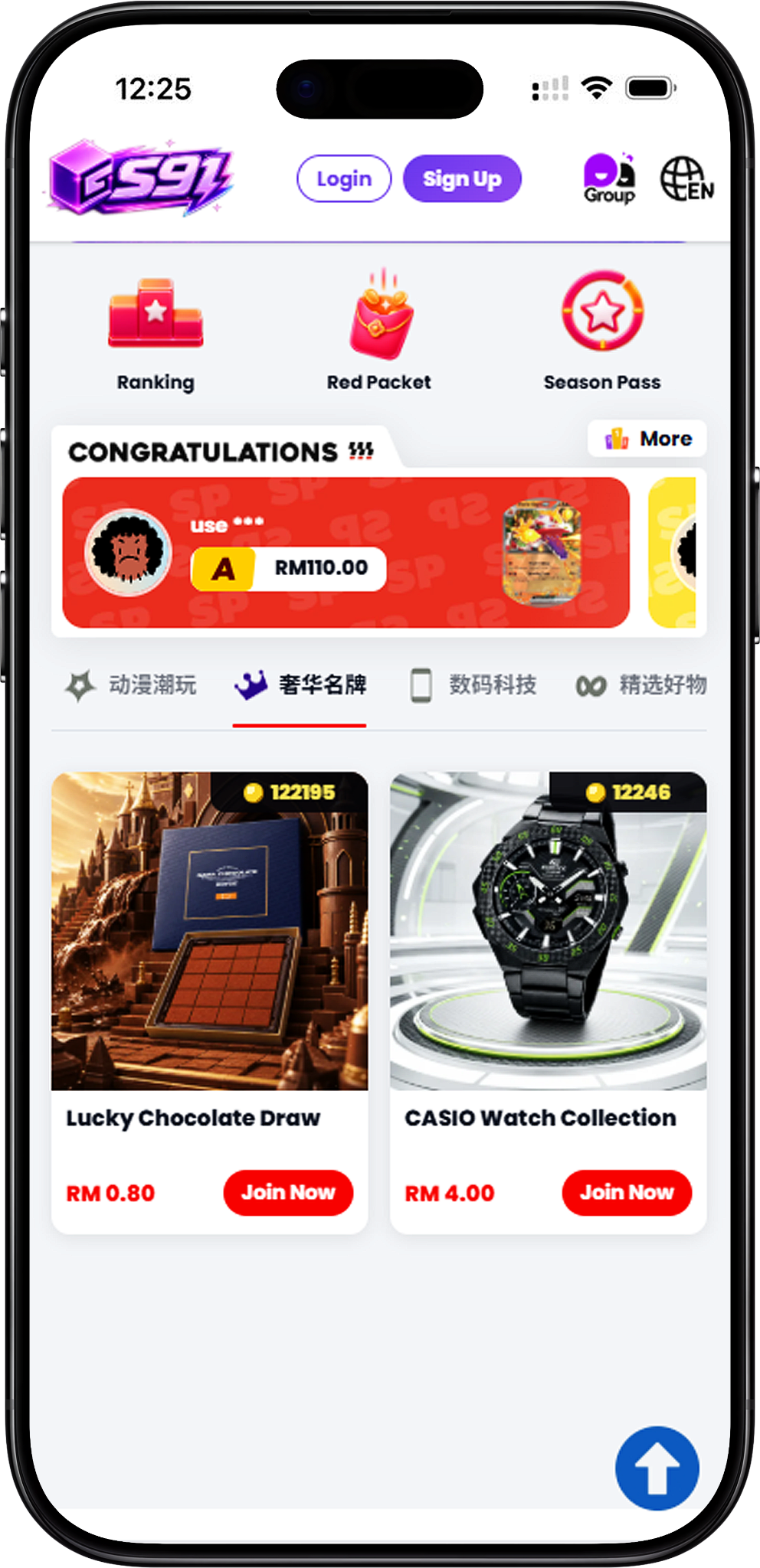
S91 Luxury Brands Lucky Draw is a dedicated category for premium-themed collections available through S91. Instead of focusing on one product type, the category covers several selections, including chocolate, watches, scents and smartphones. Users can browse the available collections and select “Join Now” to enter the corresponding Lucky Draw.
Premium-Themed Collections in One Category
The Luxury Brands category makes it easier to explore different premium product themes from one page. Each collection has its own Lucky Draw entry, allowing users to choose the type of products they are interested in before viewing the individual draw.
Luxury Brands Lucky Draw Collection
Complete S91 Luxury Brands Selection
The complete S91 Luxury Brands Lucky Draw selection includes: Lucky Chocolate Draw; CASIO Watch Collection; Luxury Scents Collection; and Apple Lab iPhone Collection. These four draws cover chocolate products, CASIO watches, luxury scents and Apple iPhone selections within the Luxury Brands category.
Explore Different Types of Luxury Brands
The S91 Luxury Brands category covers four distinct product themes. Users can choose between chocolate, watches, scents and Apple iPhone collections according to the type of Lucky Draw they want to explore.
Lucky Chocolate Draw
Lucky Chocolate Draw focuses on chocolate products. Open the collection to view the products displayed in its Lucky Draw and review the available draw information before participating.
CASIO Watch Collection
CASIO Watch Collection provides a watch-focused option within S91 Luxury Brands. Users interested in CASIO watches can enter this collection to view its displayed products and Lucky Draw details.
Luxury Scents Collection
Luxury Scents Collection is the fragrance-focused selection within the category. Enter the collection to explore the scents presented in its Lucky Draw before choosing a draw option.
Apple Lab iPhone Collection
Apple Lab iPhone Collection focuses on Apple iPhone products. Users can open this collection from the Luxury Brands page to review its displayed iPhone selections and draw information.
How to Join a Luxury Brands Lucky Draw
Joining an S91 Luxury Brands Lucky Draw starts by selecting one of the four available collections. From there, users can review the products displayed in that collection, choose an available draw quantity and check the payment details before confirming.
Step 1: Choose a Luxury Brands Collection
Browse Lucky Chocolate Draw, CASIO Watch Collection, Luxury Scents Collection and Apple Lab iPhone Collection, then select the collection you want to explore.
Step 2: Select Join Now
Select the “Join Now” button on your preferred collection to open its dedicated S91 Lucky Draw interface.
Step 3: Review the Displayed Products
Check the products presented in the selected Lucky Draw. The collection page displays individual items associated with that particular draw.
Step 4: Choose a Draw Quantity
Select one of the available draw quantity options shown on the Lucky Draw interface. The available choices include Draw 1, Draw 3, Draw 5 and Draw 10.
Step 5: Check Confirm Payment
Review the Confirm Payment section before proceeding. The interface displays your wallet balance, payment option, voucher section where applicable and the total amount for the selected draws.
Step 6: Select Pay Now
Once you have checked the displayed draw total and payment details, select “Pay Now” to confirm the selected Lucky Draw.
Luxury Brands Draw Options
S91 provides multiple draw quantity options within the Lucky Draw interface, allowing users to select the number of draws before reaching payment confirmation.
Draw 1
Choose “Draw 1” when you want to make one draw in the selected Luxury Brands collection.
Draw 3
Choose “Draw 3” to select three draws at once before reviewing the total payment amount.
Draw 5
Choose “Draw 5” when you want five draws within the selected collection.
Draw 10
Choose “Draw 10” to select ten draws at once. Check the displayed total in Confirm Payment before proceeding with Pay Now.
Check Luxury Brands Lucky Draw History
S91 provides a History section within the Lucky Draw interface. This allows users to review displayed previous draw records, browse different result categories and view historical information associated with the selected draw.
View All Draw Records
The “All” section displays previous Lucky Draw records together. Entries can show information such as the user, draw number, displayed amount and result category.
Check SP Results
Select the “SP” tab to focus on historical SP results. The History interface displays SP records separately, making it easier to review previous results in this category.
Check A Results
Select the “A” tab to review previous results classified under the A category. These records are separated from the general history for easier browsing.
Review Draw History Statistics
The History interface also provides statistical information for the selected Lucky Draw, including displayed counters for draws without SP and A results. A chart view can provide additional historical draw information for these result categories.
S91 Luxury Brands FAQ
What is S91 Luxury Brands?
S91 Luxury Brands is a Lucky Draw category containing premium-themed selections across chocolate, watches, scents and Apple iPhone products.
What Luxury Brands Lucky Draws are available on S91?
There are four listed Luxury Brands Lucky Draws: Lucky Chocolate Draw, CASIO Watch Collection, Luxury Scents Collection and Apple Lab iPhone Collection.
Does S91 Luxury Brands include watches?
Yes. CASIO Watch Collection is the watch-focused Lucky Draw available within the Luxury Brands category.
Is there an iPhone Lucky Draw in S91 Luxury Brands?
Yes. Apple Lab iPhone Collection is the iPhone-focused selection listed under the S91 Luxury Brands category.
How do I join a Luxury Brands Lucky Draw?
Choose one of the available collections, select “Join Now,” review the displayed products, choose a draw quantity and check the Confirm Payment details before selecting “Pay Now.”
What draw quantities can I choose?
The displayed Lucky Draw interface provides Draw 1, Draw 3, Draw 5 and Draw 10 options.
Can I check previous Lucky Draw results?
Yes. The History feature displays previous draw records and provides separate views for available result categories such as SP and A.
Can I review the total before payment?
Yes. The Confirm Payment interface displays the total amount for the selected draws before you choose “Pay Now.”
Explore S91 Luxury Brands
Browse chocolate, CASIO watches, luxury scents and Apple iPhone collections, then choose your preferred Luxury Brands Lucky Draw and review its details before joining.